# CodeTyper CLI

An AI-powered terminal coding agent with an interactive TUI. CodeTyper autonomously executes coding tasks using tool calls with granular permission controls and intelligent provider routing.
## How It Works
CodeTyper is an autonomous coding agent that runs in your terminal. You describe what you want to build or fix, and CodeTyper:
1. **Analyzes** your request and breaks it into steps
2. **Executes** tools (bash, read, write, edit) to accomplish the task
3. **Asks permission** before modifying files or running commands
4. **Learns** from your project to provide context-aware assistance
### Cascading Provider System
CodeTyper uses an intelligent provider routing system:
```
User Request
|
v
[Detect Task Type] --> code_generation, bug_fix, refactoring, etc.
|
v
[Check Ollama Score] --> Quality score from past interactions
|
v
[Route Decision]
|
+-- High Score (85%+) --> Ollama Only (trusted)
|
+-- Low Score (40%-) --> Copilot Only (needs improvement)
|
+-- Medium Score --> Cascade Mode
|
v
[1. Ollama generates response]
|
v
[2. Copilot audits for issues]
|
v
[3. Update quality scores]
|
v
[Return best response]
```
Over time, CodeTyper learns which provider performs best for different task types.
## Installation
**Requires [Bun](https://bun.sh) runtime** (v1.0.0+)
```bash
# Install Bun if you don't have it
curl -fsSL https://bun.sh/install | bash
# Install globally via npm
npm install -g codetyper-cli
# Or install from source
git clone https://github.com/CarGDev/codetyper.cli.git
cd codetyper.cli
bun install && bun run build && bun link
# Login to a provider
codetyper login copilot
# Start interactive chat
codetyper
```
## Features
### Interactive TUI
Full-screen terminal interface with real-time streaming responses.
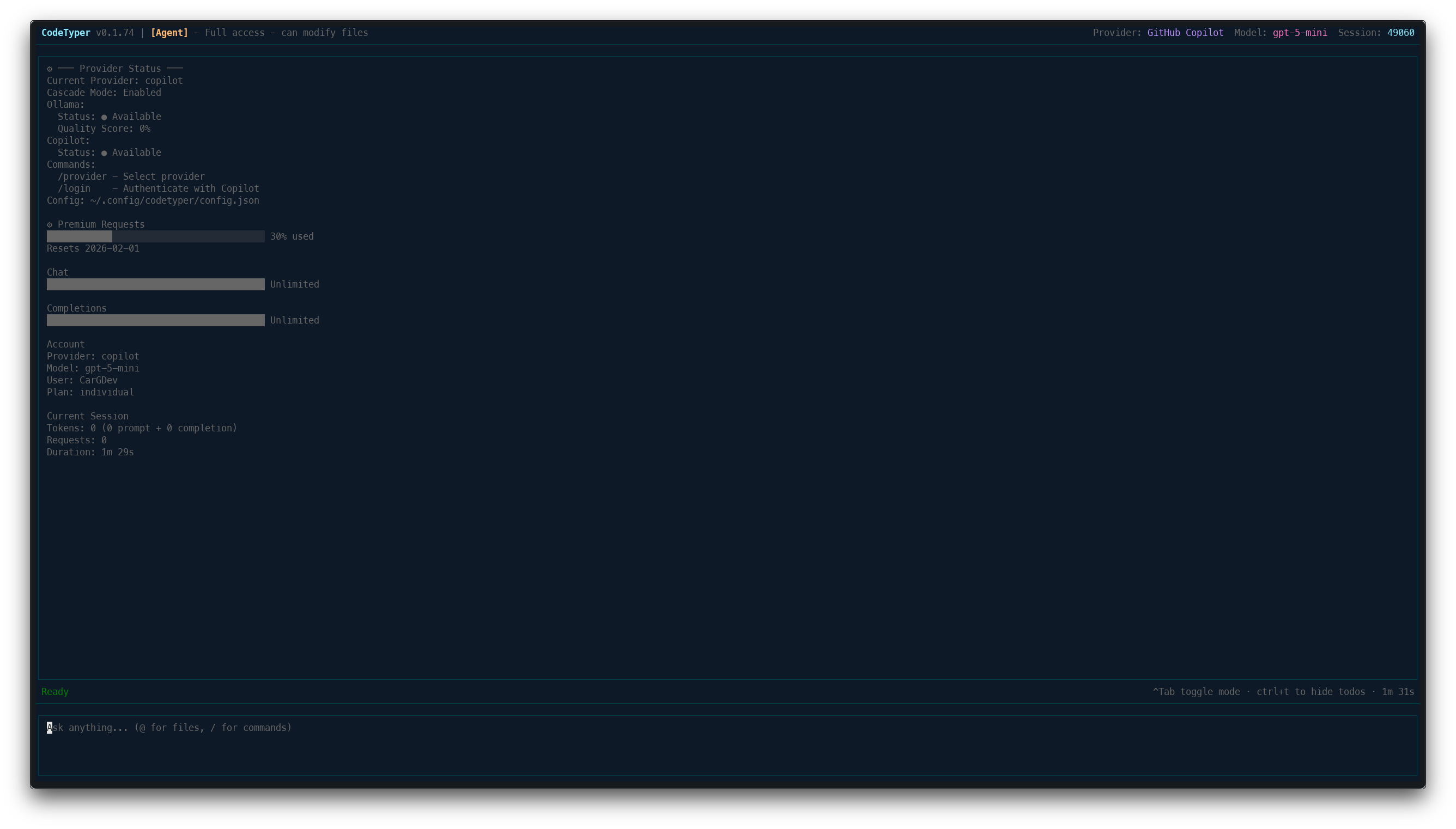
**Key bindings:**
- `Enter` - Send message
- `Shift+Enter` - New line
- `/` - Open command menu
- `Ctrl+M` - Toggle interaction mode
- `Ctrl+T` - Toggle todo panel
- `Shift+Up/Down` - Scroll log panel
- `Ctrl+C` (twice) - Exit
### Vim Motions
Optional vim-style keyboard navigation for power users. Enable in settings.
**Normal Mode:**
- `j/k` - Scroll down/up
- `gg/G` - Jump to top/bottom
- `Ctrl+d/u` - Half page scroll
- `/` - Search, `n/N` - Next/prev match
- `i` - Enter insert mode
- `:` - Command mode (`:q` quit, `:w` save)
**Configuration:**
```json
{
"vim": {
"enabled": true,
"startInNormalMode": true
}
}
```
### Command Menu
Press `/` to access all commands organized by category.
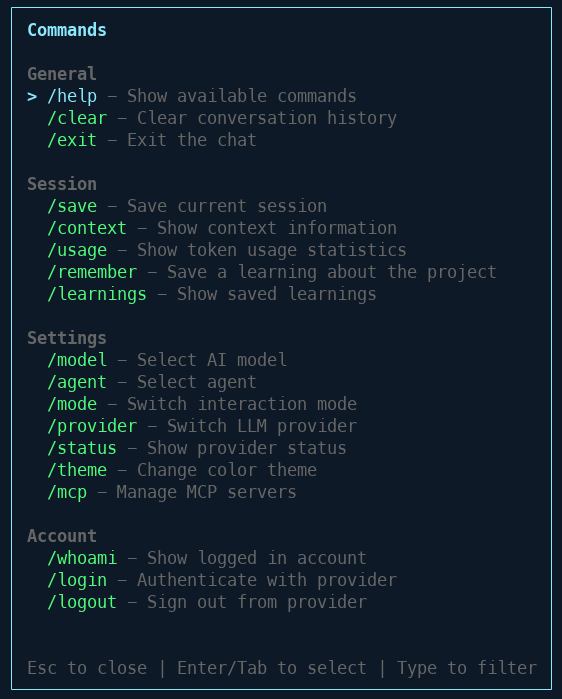
**Available Commands:**
| Category | Command | Description |
|----------|---------|-------------|
| General | `/help` | Show available commands |
| General | `/clear` | Clear conversation history |
| General | `/exit` | Exit the chat |
| Session | `/save` | Save current session |
| Session | `/context` | Show context information |
| Session | `/usage` | Show token usage statistics |
| Session | `/remember` | Save a learning about the project |
| Session | `/learnings` | Show saved learnings |
| Settings | `/model` | Select AI model |
| Settings | `/agent` | Select agent |
| Settings | `/mode` | Switch interaction mode |
| Settings | `/provider` | Switch LLM provider |
| Settings | `/status` | Show provider status |
| Settings | `/theme` | Change color theme |
| Settings | `/mcp` | Manage MCP servers |
| Account | `/whoami` | Show logged in account |
| Account | `/login` | Authenticate with provider |
| Account | `/logout` | Sign out from provider |
### Agent Mode with Diff View
When CodeTyper modifies files, you see a clear diff view of changes.
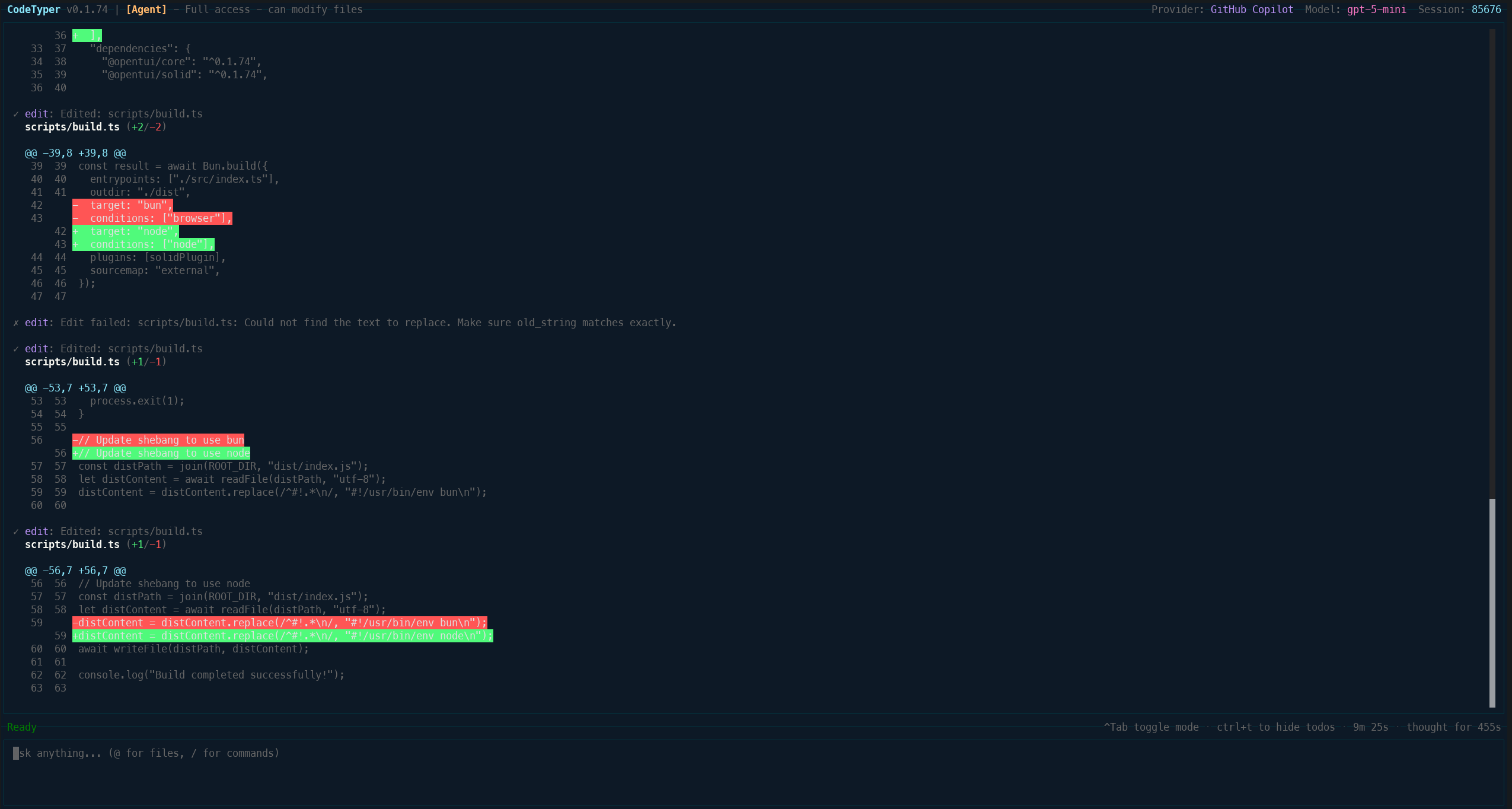
**Interaction Modes:**
- **Agent** - Full access, can modify files
- **Ask** - Read-only, answers questions
- **Code Review** - Review PRs and diffs
### Permission System
Granular control over what CodeTyper can do. Every file operation requires approval.
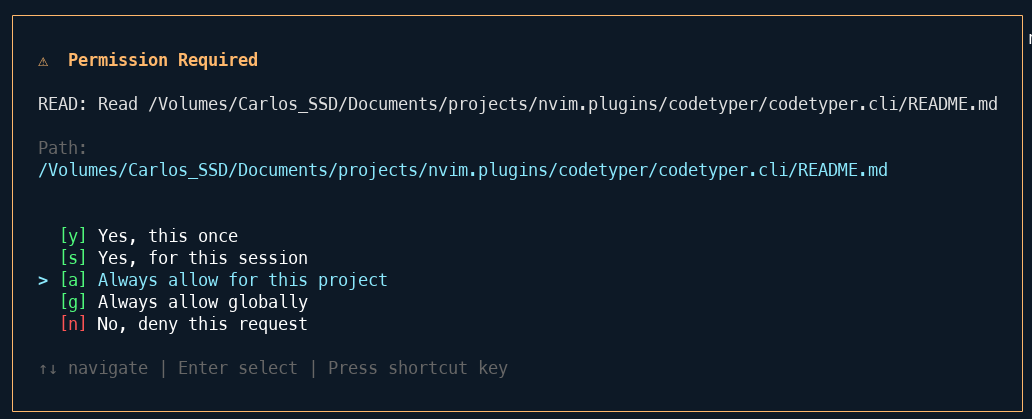
**Permission Scopes:**
- `[y]` Yes, this once
- `[s]` Yes, for this session
- `[a]` Always allow for this project
- `[g]` Always allow globally
- `[n]` No, deny this request
### Model Selection
Access to multiple AI models through GitHub Copilot.
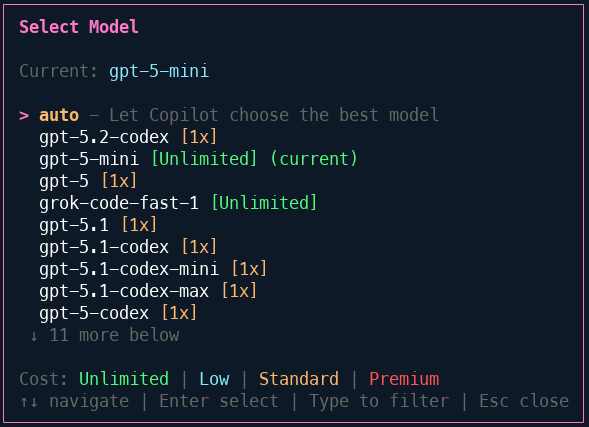
**Available Models:**
- GPT-5, GPT-5-mini (Unlimited)
- GPT-5.2-codex, GPT-5.1-codex
- Grok-code-fast-1
- And more...
### Theme System
14+ built-in themes to customize your experience.
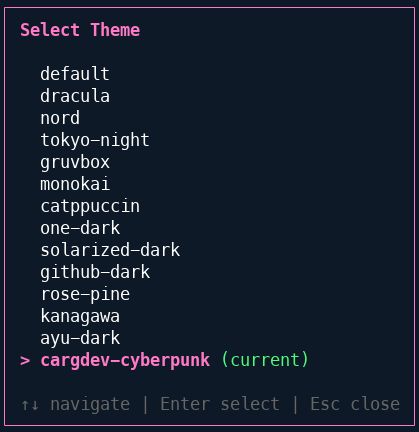
**Available Themes:**
default, dracula, nord, tokyo-night, gruvbox, monokai, catppuccin, one-dark, solarized-dark, github-dark, rose-pine, kanagawa, ayu-dark, cargdev-cyberpunk
## Providers
| Provider | Models | Auth Method | Use Case |
|----------|--------|-------------|----------|
| **GitHub Copilot** | GPT-5, Claude, Gemini | OAuth (device flow) | Cloud-based, high quality |
| **Ollama** | Llama, DeepSeek, Qwen, etc. | Local server | Private, offline, zero-cost |
### Cascade Mode
When both providers are available, CodeTyper can use them together:
1. **Ollama** processes the request first (fast, local)
2. **Copilot** audits the response for issues
3. Quality scores update based on audit results
4. Future requests route based on learned performance
Check provider status with `/status`:
```
═══ Provider Status ═══
Current Provider: copilot
Cascade Mode: Enabled
Ollama:
Status: ● Available
Quality Score: 72%
Copilot:
Status: ● Available
```
## Configuration
Settings are stored in `~/.config/codetyper/config.json`:
```json
{
"provider": "copilot",
"model": "auto",
"theme": "default",
"cascadeEnabled": true,
"maxIterations": 20,
"timeout": 30000
}
```
### Project Context
CodeTyper reads project-specific context from:
- `.github/` - GitHub workflows and templates
- `.codetyper/` - Project-specific rules and learnings
- `rules.md` - Custom instructions for the AI
## CLI Usage
```bash
# Start interactive TUI
codetyper
# Start with a prompt
codetyper "Create a REST API with Express"
# Continue last session
codetyper --continue
# Resume specific session
codetyper --resume
# Use specific provider
codetyper --provider ollama
# Print mode (non-interactive)
codetyper --print "Explain this codebase"
```
## Tools
CodeTyper has access to these built-in tools:
| Tool | Description |
|------|-------------|
| `bash` | Execute shell commands |
| `read` | Read file contents |
| `write` | Create or overwrite files |
| `edit` | Find and replace in files |
| `glob` | Find files by pattern |
| `grep` | Search file contents |
| `lsp` | Language Server Protocol operations |
| `web_search` | Search the web |
| `todo-read` | Read current todo list |
| `todo-write` | Update todo list |
### MCP Integration
Connect external MCP (Model Context Protocol) servers for extended capabilities:
```bash
# Browse and search available servers
/mcp browse # Interactive browser
/mcp search # Search by keyword
/mcp popular # Show popular servers
/mcp categories # List all categories
# Install a server
/mcp install sqlite
/mcp install github
# Manage servers
/mcp status # Show connected servers
/mcp connect # Connect all servers
/mcp disconnect # Disconnect all servers
/mcp tools # List available tools
/mcp add # Add custom server
```
**MCP Browser Features:**
- Search by name, description, or tags
- Filter by category (database, web, AI, etc.)
- View server details and required environment variables
- One-click installation and connection
- 15+ verified servers from Anthropic
## Extensibility
### Hooks System
Lifecycle hooks for intercepting tool execution and session events.
**Hook Events:**
- `PreToolUse` - Validate/modify before tool execution
- `PostToolUse` - Side effects after tool execution
- `SessionStart` - At session initialization
- `SessionEnd` - At session termination
- `UserPromptSubmit` - When user submits input
- `Stop` - When execution stops
**Configuration** (`.codetyper/hooks.json`):
```json
{
"hooks": [
{ "event": "PreToolUse", "script": ".codetyper/hooks/validate.sh", "timeout": 5000 },
{ "event": "PostToolUse", "script": ".codetyper/hooks/notify.sh" }
]
}
```
**Exit Codes:**
- `0` - Allow (optionally output `{"updatedInput": {...}}` to modify args)
- `1` - Warn but continue
- `2` - Block execution
### Plugin System
Extend CodeTyper with custom tools, commands, and hooks.
**Plugin Structure:**
```
.codetyper/plugins/{name}/
├── plugin.json # Manifest
├── tools/
│ └── *.ts # Custom tool definitions
├── commands/
│ └── *.md # Slash commands
└── hooks/
└── *.sh # Plugin-specific hooks
```
**Manifest** (`plugin.json`):
```json
{
"name": "my-plugin",
"version": "1.0.0",
"tools": [{ "name": "custom_tool", "file": "tool.ts" }],
"commands": [{ "name": "mycommand", "file": "cmd.md" }]
}
```
**Custom Tool Definition:**
```typescript
import { z } from "zod";
export default {
name: "custom_tool",
description: "Does something",
parameters: z.object({ input: z.string() }),
execute: async (args, ctx) => ({ success: true, title: "Done", output: "..." }),
};
```
### Session Forking
Branch and rewind session history for experimentation.
**Commands:**
| Command | Description |
|---------|-------------|
| `/snapshot [name]` | Create checkpoint |
| `/rewind [n\|name]` | Go back to snapshot |
| `/fork [name]` | Branch current session |
| `/forks` | List all forks |
| `/switch [name]` | Switch to fork |
Sessions are stored in `.codetyper/sessions/` with automatic commit message suggestions.
## Development
```bash
# Watch mode
bun run dev
# Type check
bun run typecheck
# Build
bun run build
# Run tests
bun test
# Lint
bun run lint
```
## Documentation
- [Changelog](docs/CHANGELOG.md) - Version history and changes
- [Contributing](docs/CONTRIBUTING.md) - How to contribute
## License
MIT - See [LICENSE](LICENSE) for details.